01 / DASHBOARD
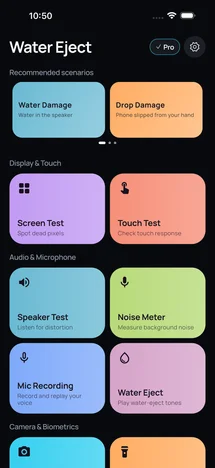
All tests at a glance
Quick access to water ejection, audio, screen, camera, and sensor tests.

Clear muffled speakers. Check your hardware.
When water leaves your speaker sounding muffled, a tuned sound frequency helps push moisture out of the speaker grill. You can also check screen pixels, touch response, microphones, sensors, and Face ID directly on your device.
INTERFACE PREVIEW
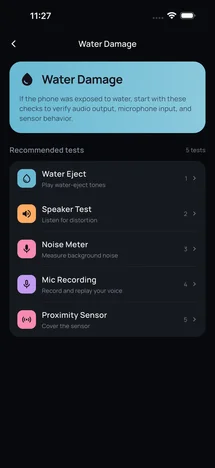
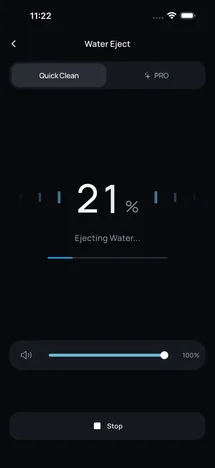
Everything you need right after contact with water, or when inspecting an iPhone before buying.
CAPABILITIES
Real sensor readings and interactive tests instead of abstract scores.
A tuned acoustic wave vibrates the speaker membrane to help push out trapped moisture when audio sounds muffled.
Full-screen color tests to spot dead pixels and live touch tracking to locate dead zones.
Verify ear speaker, stereo output, and built-in microphones with instant audio tests.
Live readings for accelerometer, gyroscope, compass, proximity sensor, GPS, and Face ID.
HOW IT WORKS
Three quick steps to clear moisture and verify your iPhone.
Run the water eject cycle right after liquid contact until sound becomes crisp again.
Follow the guided scenario to test the screen, microphones, and internal sensors.
Review live readings from your sensors, audio, and display when checking a phone after water contact or before buying used.
WATER EJECT FOR iOS
Clear muffled speakers after water contact and run iPhone hardware checks.